
One foundation under every team.
The Xifdesk platform decides who can sign in, which organization and brand they work in, and what they are allowed to see and do. Every module is built on it, so every module shares it.
Six modules, standing on the same ground.
Modules are where the work happens. Underneath, one shared layer holds the people, the data and the permissions, and one set of platform services keeps it running for every team.
- CRMLeads, pipelines, AI proposals and hires across every brand.
- Intelligent Client ManagementThe next client reply, drafted from the conversation and your own work.
- HRMAttendance, leave, hiring, exits and reviews in one people system.
- Payroll and AccountsA five-step payroll run that posts straight into your books.
- Project ManagementSprints, change requests and approved hours from the day a deal is won.
- Employee NavigatorEvery employee’s own portal for time, leave, pay and people.
One set of people
Every employee has one record and one login, used by HR, payroll, projects, sales and the employee portal.
One set of data
A lead, a hire, a project or a payslip is entered once and read by every team that needs it.
One set of permissions
Roles decide what each person can see and do in every module, on every brand.
- Single sign-on
- Organizations and brands
- Roles and permissions
- Notifications
- Audit trail
- AI services
An organization is ready in one step.
A super admin creates everything a new organization needs at once, then chooses which tools it gets: Sales and Marketing, the HR Portal, the Employee Navigator and the Accounts Portal.
-
Organization
The organization is created with its platform defaults.
-
First brand
Its first brand, with a name, colour, logo and sales flow.
-
Admin role
An administrator role built from the permission matrix.
-
Admin user
The first administrator is added to the organization.
-
Sign-in code
A sign-in code is emailed, and the admin takes it from there.
Several brands, one organization.
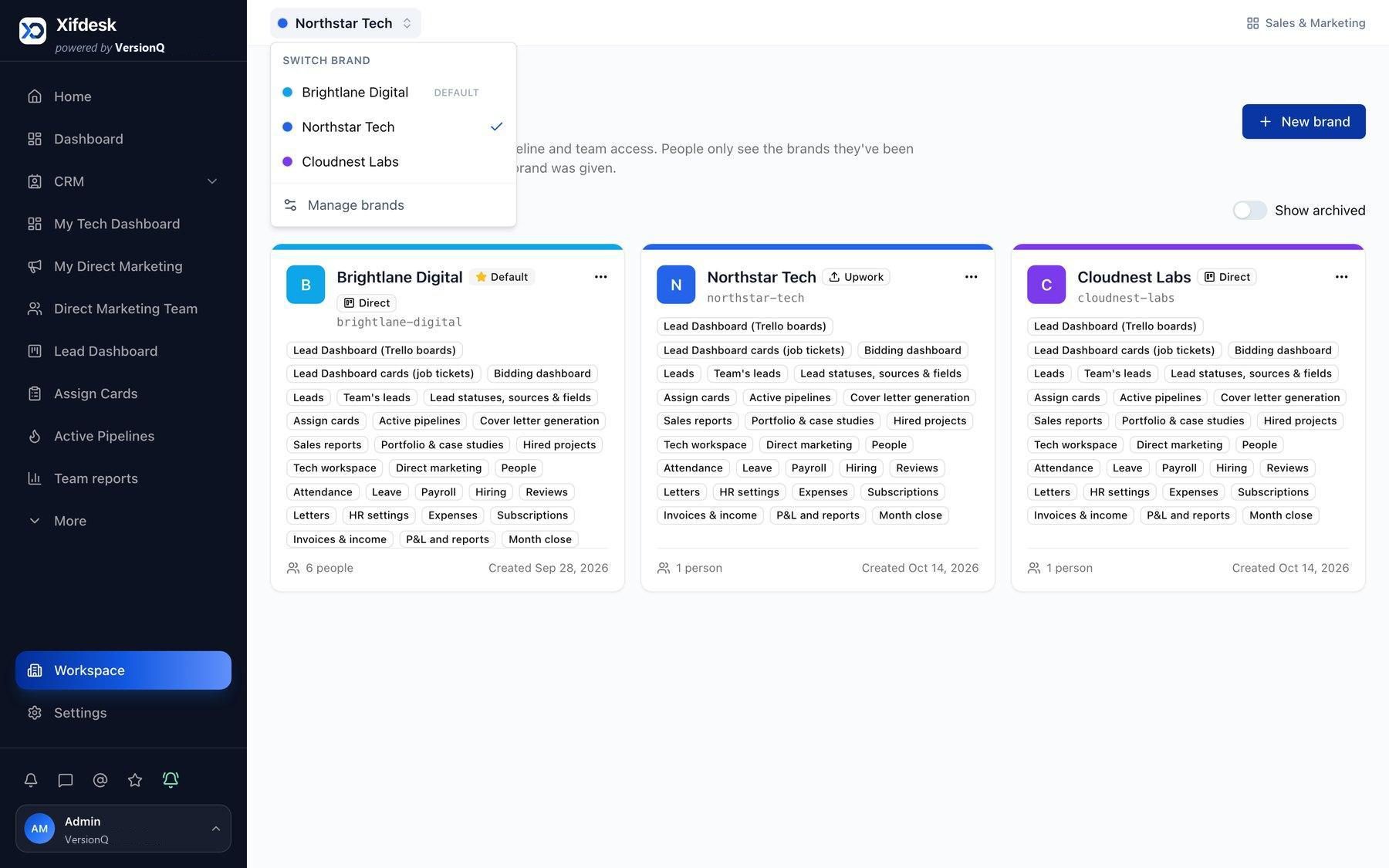
Each brand has its own name, colour and logo, and its own sales flow: a marketplace bidding flow or direct sales. Statuses, lead sources, custom fields, boards and team access belong to the brand, and capabilities are switched on per brand, so a direct-sales brand never shows bidding screens.
Try it: switch between the three sample brands.
The whole workspace moves to the chosen brand. People only see the brands they have been given.
- Call scheduled
- Estimation required
- Queries
- Estimation shared
- Hired clients
- On hold
- Lead dashboard boards (on)
- Bidding dashboard (on)
- Cover letter generation (on)
- Assign cards (on)
- Active pipelines (off)
- Direct marketing (off)
- Sales reports (on)
- Portfolio and case studies (on)
Roles built from a permission for every action.
Every feature has view, create, edit, delete, import, export, assign, approve and manage actions. Start from a quick-start template or a ready-made HR and accounts role, limit a role to specific brands, and give a person several roles; their permissions combine.
Ticking any action also ticks View, because you cannot edit what you cannot see. Unticking View clears the row.
Try it: tick a few actions, then untick View. Fictional sample data.
See the platform in the product.
Brands
Each brand has its own sales flow, capabilities and team access, with a switcher in the header.
Roles and permissions
Build roles from a permission matrix, limit them to brands, and start from quick presets.
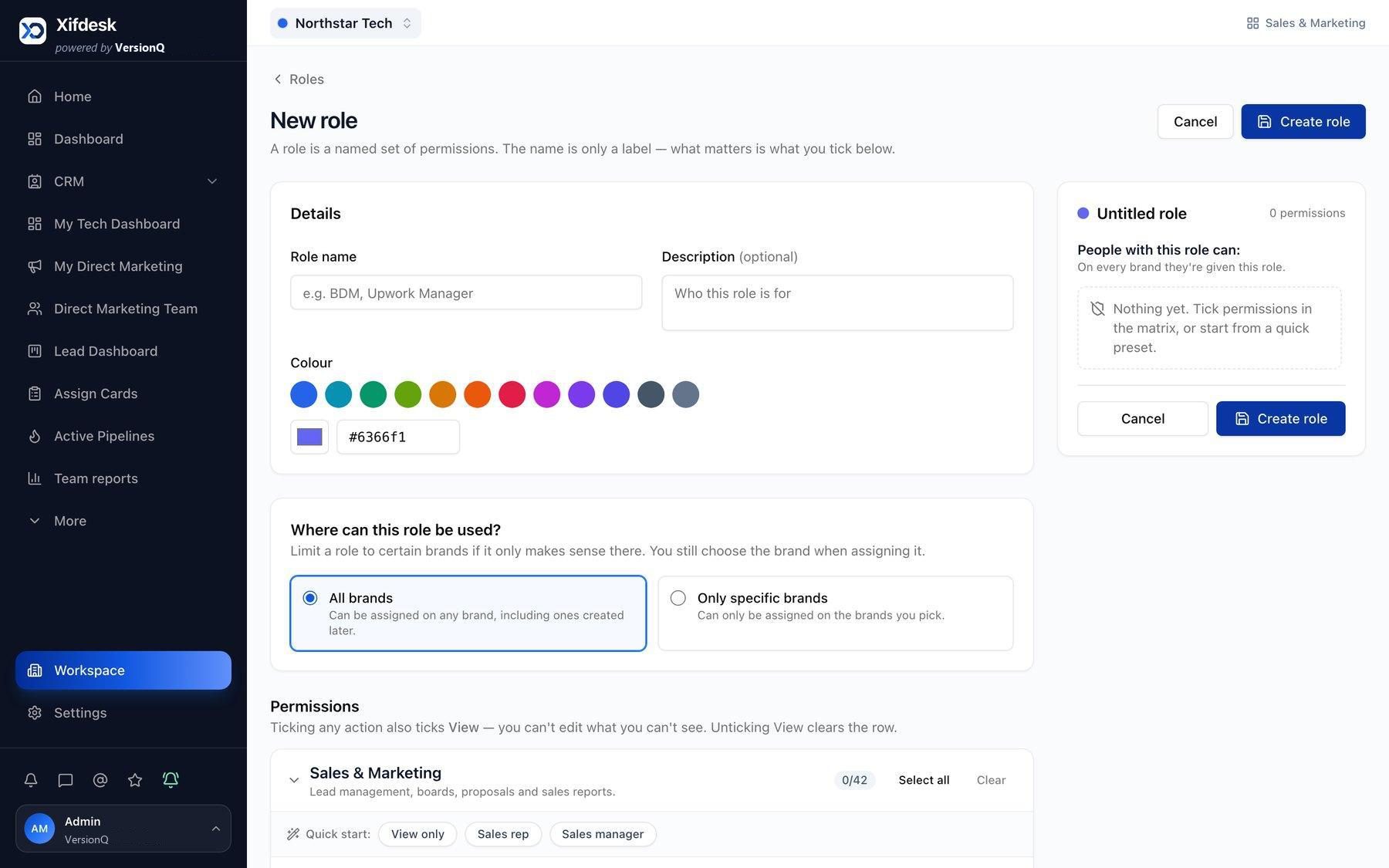
Screens from the Xifdesk product. Names, clients and figures are sample data.
Everything every module relies on.
The parts of the platform people meet every day, and the controls administrators rely on.
Sign-in
- Password or emailed one-time code sign-in
- Invite and reset links
- One login across CRM, HRM, Project Management and the employee portal
Notifications
- Real-time in-app notifications
- Browser notifications and email
- For mentions, assignments, due dates, approvals and targets
Getting started
- A guided product tour
- A first-login setup wizard
- A company policy every user accepts before starting
Activity and audit
- Activity history across records
- An audit trail of sensitive changes
- Every change to access recorded
Organizations and AI administration
- Organizations can be suspended or reactivated, and a super admin can view the platform as any organization admin for support
- Platform settings for announcements, defaults for new organizations, brand limits and support contacts
- A choice of AI model provider, versioned prompts, and token and cost tracking per organization and user
What the foundation carries
- CRM Brands give each sales team its own flow, statuses and boards, while leadership sees them all.
- HRM Ready-made HR roles, approvals and one employee record shared with payroll and projects.
- Enterprise control Permissions, brand-scoped roles, approvals and the audit trail, seen from a leadership view.
See the platform under your teams.
A walkthrough shaped around your teams: how sales, client conversations, people, payroll and delivery would work together on Xifdesk.